

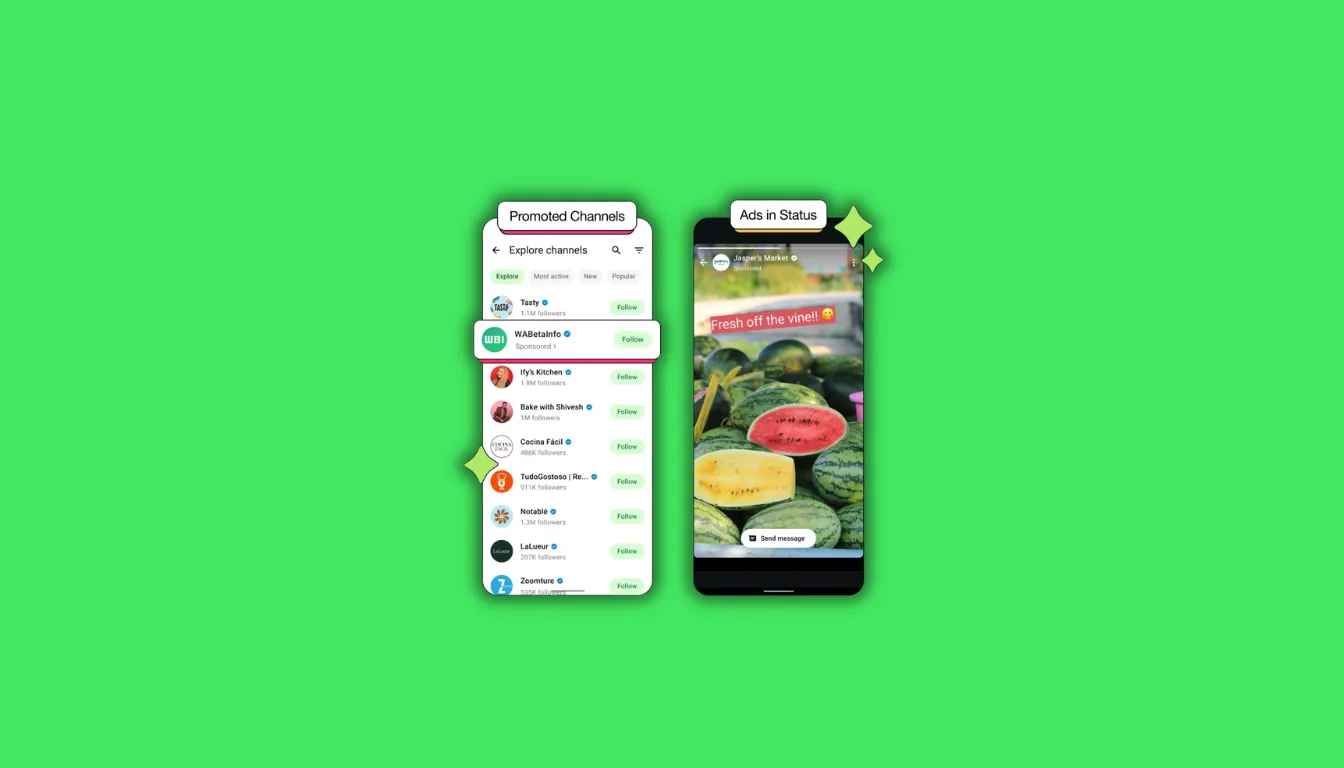
If you opened WhatsApp this week and noticed something unfamiliar between your contacts’ Status updates, you’re not imagining things. WhatsApp Status Ads are now a global reality, rolling out to users worldwide as of February 2026. For a platform that built its entire identity on being the messaging app that would never show you ads, this is a significant moment. You probably have questions: what exactly are these ads, who can see your data, and is there anything you can do about it? This guide answers all of that clearly.
What Are WhatsApp Status Ads and Where Do They Appear
WhatsApp Status Ads are sponsored posts that appear inside the Updates tab of your WhatsApp app. They show up between the Status updates posted by your contacts, formatted in exactly the same full-screen style as a regular Status. Each one is clearly labeled with the word “Sponsored” so you can tell it apart from content your friends and family posted. You can swipe past them instantly. They don’t interrupt your messaging, and they don’t appear in your chats, your calls, or your groups.
The Updates tab is the section of WhatsApp where you go to view 24-hour Status posts from the people in your contacts. It works a lot like Stories on other platforms. It sits completely separately from your conversations. That distinction matters, because it means WhatsApp ads are contained entirely in one specific area of the app. If you never open the Updates tab, you genuinely won’t encounter a single ad.
What Does a WhatsApp Status Ad Actually Look Like
Picture a full-screen photo or short video from a business, sitting between two Status updates from contacts. It’s labeled “Sponsored” at the top of the screen. Many of these ads include a “Message Business” button at the bottom, which lets you start a conversation with the advertiser directly if you choose to tap it. You’re never forced to interact. A simple swipe takes you to the next update, and the whole thing is over in under a second.
What Are WhatsApp Promoted Channels
Promoted Channels are a separate but related feature. When you browse the Channels directory inside WhatsApp, you’ll now see some Channels listed with a “Promoted” label. These are businesses or creators who have paid to appear higher in the discovery feed so more people find and follow them. Think of it like a sponsored listing in a directory. The Channel itself works the same way as any other WhatsApp Channel once you’re inside it. The promotion only affects how prominently it shows up when people are browsing.
The businesses using Promoted Channels tend to be local services, brands, and content creators who want to grow their audience on the platform. A local gym, a coffee chain, or a news publication might pay to appear near the top of the directory when someone in their city browses for new Channels to follow. It’s a visibility tool for businesses, not a change to how Channels function for the people following them.
What Data Does WhatsApp Use to Target Ads
Here’s the thing most people want to know first: does WhatsApp read your messages to decide which ads to show you? The answer is no. Your private conversations are end-to-end encrypted, which means not even WhatsApp’s own systems can access the content of what you type. That’s been true since 2016, and the introduction of advertising doesn’t change it.
What WhatsApp does use is considerably more limited. According to official guidance, ad targeting is based on broad signals: your general location (city or country), the language your device is set to, which Channels you already follow, and how you’ve interacted with ads in the Updates tab before. That’s a much thinner targeting profile compared to what most other advertising platforms work with.
What Happens If You’ve Linked Your Account to a Meta Profile
This is where things get more nuanced. If you’ve connected your WhatsApp account through your device settings to a broader profile that includes your activity on other Meta-owned platforms, then advertising can draw on a wider pool of information from your behavior across those services. This cross-platform data sharing is opt-in, not automatic. You can check whether your WhatsApp is connected to a broader profile by going into your settings and looking for the account linking section. If it’s connected and you’d prefer to limit that, you can unlink it right there.
Most guides skip this part, but it’s genuinely the most important thing to understand about WhatsApp ad targeting. The default experience uses limited data. The expanded targeting only applies if you’ve voluntarily linked accounts. Knowing which situation you’re in takes about thirty seconds to check and gives you much more clarity than reading a privacy policy ever would.
Can WhatsApp Read Your Messages to Show You Ads
No. End-to-end encryption means the content of your private messages, group chats, and calls is inaccessible to anyone outside the conversation, including WhatsApp itself. This hasn’t changed. Privacy researchers have consistently confirmed that the encryption architecture used by WhatsApp is genuine and not cosmetic.
What the ad rollout does introduce is a new data relationship between you and Meta’s advertising infrastructure, even if that relationship is currently limited to the Updates tab surface. The concern worth watching isn’t whether your chats are being read today. It’s whether the signals used for targeting gradually expand over time as the advertising product matures. Digital rights organisations have flagged this as the most important thing for users to monitor across 2026 and beyond.
How to Manage Your WhatsApp Ad Experience
You can’t turn WhatsApp ads off completely. That’s the honest answer, and it’s worth saying plainly rather than sending you through a confusing settings menu to discover it yourself. What you can do is control quite a bit about how ads behave and which businesses can reach you.
How to Skip or Dismiss an Ad
You swipe. That’s the whole method. WhatsApp Status Ads behave like any other Status card in the Updates tab. Swipe left or right to move past the ad instantly. There’s no countdown timer, no mandatory viewing window, and no autoplay audio. It’s a passive ad format by design.
How to Hide or Block a Specific Business
If a specific ad bothers you, tap on it while it’s on screen. You’ll see an option to hide that particular ad or to block all future ads from that business entirely. Hiding removes that one ad from your view. Blocking means you won’t see that advertiser’s content in the Updates tab again. These are two distinct actions, and understanding the difference matters if you want to cut off a specific company rather than just skip a single post.
How to See Why You’re Seeing a Specific Ad
WhatsApp now includes a “Why you’re seeing this ad” option when you tap on a sponsored Status. It tells you which targeting factor placed that ad in front of you, whether that’s your location, your language setting, a Channel you follow, or your previous ad interactions. I tested this feature immediately after the update came through on my device, and I found it more transparent than I expected. It actually tells you something useful rather than giving you a vague non-answer.
The EU Ad-Free Subscription Option
If you’re a user aged 18 or older based in certain European countries, you currently have the option to pay a monthly subscription fee to remove ads from the Updates tab entirely. This exists because of regulatory pressure around data and advertising consent in Europe. The subscription doesn’t change anything about your messaging experience. It simply removes sponsored content from your Status browsing. If you’re in a qualifying region, you can check eligibility through your WhatsApp settings.
Why WhatsApp Is Showing Ads Now
WhatsApp was founded with an unusually strong anti-advertising philosophy. Its founders wrote publicly in 2012 that advertising-supported products treat users as the product rather than the customer. That belief was one of WhatsApp’s defining traits, and it was a major reason millions of people trusted the platform with their most personal conversations.
When the company was acquired for $19.3 billion in 2014, those principles were promised to remain intact. For several years, they did. A push to introduce Status advertising in 2018 was abandoned after significant backlash, and both co-founders eventually left the company. The idea sat dormant through 2019, 2020, 2021, 2022, 2023, and most of 2024. Testing quietly resumed in select markets in late 2025. And then, in February 2026, the global rollout happened.
The financial reality behind the decision is straightforward. Industry analysts project WhatsApp’s advertising revenue could reach $6 billion in 2026 alone. With over three billion monthly active users and roughly 1.5 billion people opening the Updates tab daily, the platform represents one of the largest untapped advertising surfaces on the internet. The pressure to monetize that reach has been building for years. That doesn’t make the change feel better to long-time users, but it does explain why it’s finally here.
WhatsApp Status Ads vs Instagram Stories Ads
Many people assume WhatsApp ads and Instagram ads work identically since both sit under the same parent company. The experience looks similar on the surface, but the targeting works quite differently.
| Feature | WhatsApp Status Ads | Instagram Stories Ads |
|---|---|---|
| Placement | Updates tab only | Stories feed |
| Targeting data used | Location, language, Channels followed, ad interactions | Full cross-platform behavioral profile |
| Skip option | Instant swipe | Skip after a few seconds |
| Private message data used | No | No |
| Ad-free option | EU subscription available | None |
| CTA format | Message Business button | Multiple formats |
The key difference is targeting depth. On one platform, advertisers can draw on years of behavioral data across the entire ecosystem. On WhatsApp, at least in its current default state, the targeting is considerably blunter. That may shift over time, but right now WhatsApp Status Ads reach you on much broader signals than most digital advertising you encounter elsewhere.
Take Control Before Someone Else Does
Your private messages are safe, and the end-to-end encryption that protects them hasn’t changed. WhatsApp Status Ads are a real shift to a feature you may use occasionally, but they don’t touch the conversations most people open WhatsApp for in the first place. Take five minutes this week to do three things: check whether your account is linked to a broader Meta profile, block any business that keeps showing up in your Updates tab, and tap “Why you’re seeing this” on the next ad you encounter so you understand which signal triggered it.
Knowing exactly how the system works puts you in a much stronger position than wondering about it. You’ve got more control here than most people realise.
Frequently Asked Questions
Will WhatsApp ads ever appear in private chats?
WhatsApp has confirmed ads only appear in the Updates tab and will not appear in private chats.
What is the WhatsApp Updates tab?
It’s the section of the app where you view 24-hour Status posts from your contacts.
Can I turn off all ads on WhatsApp completely?
You can’t fully remove ads unless you qualify for the EU paid subscription option.
Does WhatsApp use group chat activity for ads?
No. Group chat content is end-to-end encrypted and is not used for ad targeting.
How is the EU situation different for WhatsApp ads?
European users aged 18 and older can pay a monthly fee to remove ads from WhatsApp.
If I never open Updates, will I see any ads?
No. WhatsApp Status Ads only appear inside the Updates tab when you open it.
What happens when I block a business on WhatsApp?
That business can no longer show you ads in WhatsApp’s Updates tab at all.
Are Promoted Channels the same as regular Channels?
No. Promoted Channels are paid directory listings. The Channel content itself is identical.