

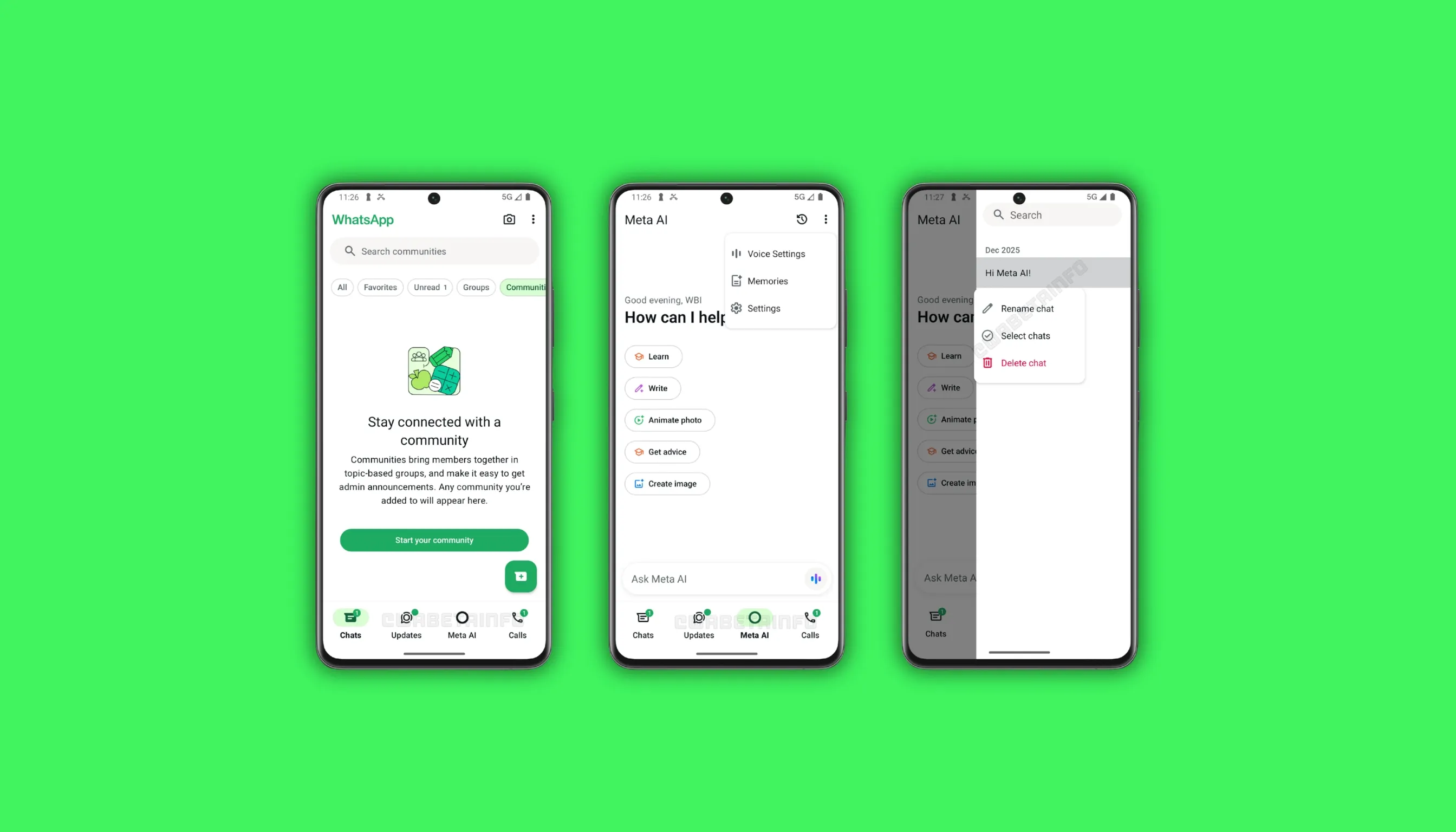
WhatsApp is rolling out a dedicated Meta AI tab to some Android beta testers through the Google Play Beta Program, bringing all AI-powered features together in one centralized location. The update is available in WhatsApp beta for Android version 2.26.10.5 and introduces a new tab in the bottom navigation bar. This tab replaces the Communities tab and gives users a single entry point for text chat, voice interaction, and AI image creation.
What the WhatsApp Meta AI Tab Does
The Meta AI tab is a dedicated section in the bottom navigation bar that serves as a central hub for every AI-powered feature on WhatsApp for Android. Users can access the Meta AI chatbot directly from this tab by typing a prompt into the bottom search bar, which delivers a response without requiring users to open a separate chat thread. The tab also displays helpful suggestions to guide users who are new to interacting with Meta AI, making the onboarding experience more straightforward.
WhatsApp has also added two separate entry points for placing a voice call with Meta AI from within this tab. The first entry point sits inside the bottom search bar, where users can tap a voice button to start a real-time voice conversation with the chatbot immediately. The second entry point appears in the context menu at the top of the screen, which also provides shortcuts to manage chatbot memory and review all media previously shared with Meta AI during past conversations.
How the Meta AI Tab Changes WhatsApp Navigation
The Meta AI tab in WhatsApp for Android replaces the Communities tab that previously occupied a position in the bottom navigation bar. WhatsApp made this change after integrating community group chat creation and management directly into the Chats tab, where users can now create and filter community group chats through a preset list. This means the removal of the Communities tab from the main navigation bar does not reduce any existing functionality for community members on Android.
WhatsApp had earlier considered replacing the Communities tab with a general section for AI-powered chats before shifting to an exclusive tab for Meta AI. The Meta-owned messaging app has also removed the floating action button that used to appear in the Chats tab as a shortcut to the Meta AI chatbot. Removing this button keeps the chat list uncluttered, allowing users to focus on their personal and group conversations without a persistent AI shortcut appearing in the main interface.
Conversation History and Thread Management in the New Tab
The Meta AI tab also includes a section for reviewing past conversations with the chatbot, organized as individual threads. Every time users start a new conversation with Meta AI, WhatsApp creates a separate thread and generates a title for it automatically. This system allows users to return to any previous conversation and pick up where they left off without losing earlier context. The thread organization makes it easy to find specific past interactions with the chatbot at any time.
WhatsApp also allows users to create and animate images directly from within the Meta AI tab on Android. This image creation capability is among the most visually engaging features available through the new tab. Together with text chat, voice calls, conversation history, and AI suggestions, the Meta AI tab brings together a set of tools that positions WhatsApp as a more capable AI platform for its Android user base, with the rollout currently limited to some beta testers.
Availability of the Meta AI Tab for Android Beta Testers
The Meta AI tab is currently rolling out to a limited number of users enrolled in the WhatsApp beta program for Android and is not yet available to all beta testers. WhatsApp has not officially disclosed which regions are part of this initial test, though countries such as India, Indonesia, and the United States are frequently among the first to receive limited beta rollouts. Users outside these regions may need to wait longer before the tab becomes accessible on their devices.
Android users interested in accessing the Meta AI tab can join the WhatsApp beta program through the Google Play Store by navigating to the WhatsApp app page and enrolling in the testing section. Once enrolled, WhatsApp updates automatically to the latest beta version, which may include the Meta AI tab depending on regional availability. WhatsApp is expected to expand this rollout to more Android beta testers in the coming weeks before a broader stable release. The feature is not yet available for iPhone users.
Stay Updated with AllBetaInfo
Follow AllBetaInfo on Medium and X to stay informed about new WhatsApp features under development and those rolling out to WhatsApp beta for Android, iOS, Web, and Windows. Curious about WhatsApp parent-managed accounts for Android and iOS? Read our full coverage to stay ahead of every WhatsApp update.