

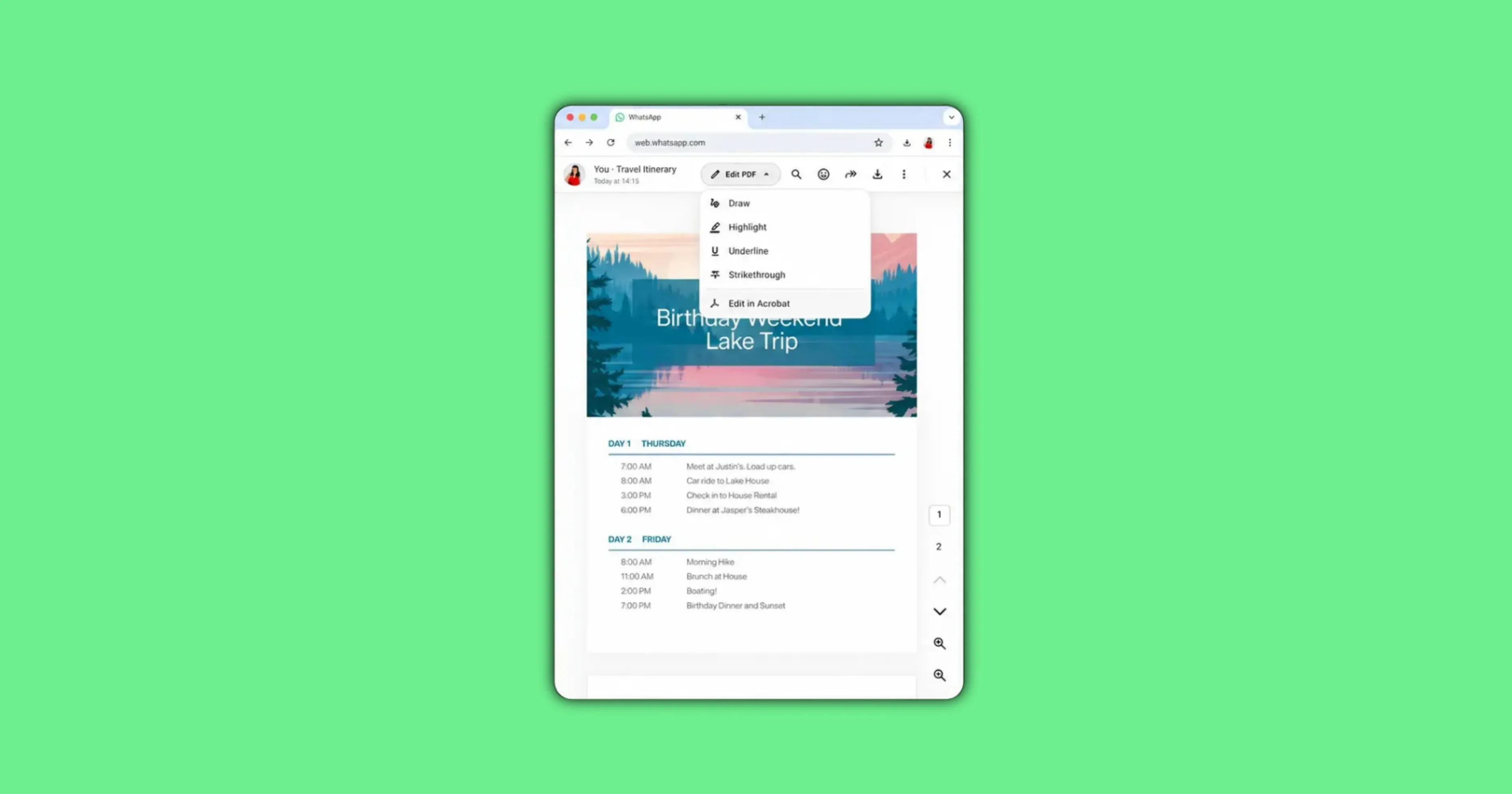
WhatsApp has released its Adobe Acrobat powered PDF feature for Windows desktop users, letting people open and annotate PDF files directly inside a chat. The tool first launched on WhatsApp Web in version dated April 30 2026, and this July 22 2026 update extends it to Windows along with new highlighting tools. AllBetaInfo tested the feature directly on WhatsApp Web to confirm how it works.
What Changed Today Versus What Launched in April
Adobe’s own blog post from April 30 2026 introduced Acrobat powered PDF viewing inside WhatsApp Web, stating at the time that Windows support was coming soon. WhatsApp’s July 22 2026 blog post confirms that promise has now shipped, bringing the same PDF viewing tool to the WhatsApp desktop app for Windows. This is an expansion of an existing feature, not a brand new launch, a distinction most coverage of the update has missed.
The April rollout let Web users open PDFs sent in a chat without downloading them first, using an Acrobat powered viewer built into the browser. That original release did not include annotation tools. The July update adds those tools on top of the Windows expansion, giving users on both Web and Windows the ability to highlight and mark up a PDF from inside the same chat window where it was shared.
How to Open and Annotate a PDF in WhatsApp
On WhatsApp Web, tapping a PDF sent in a chat opens it inline using the Acrobat powered viewer, with no separate download step and no redirect to a new tab. AllBetaInfo confirmed this by opening a real PDF inside a live WhatsApp Web chat. The file displayed instantly in the viewer, with a visible annotation toolbar sitting above the document for highlighting and marking text.
The annotation toolbar lets a user highlight sections of the PDF directly inside the chat view. An Edit in Acrobat button also appears, handing the file off to Adobe Acrobat for deeper editing outside WhatsApp. This handoff button was visible during testing, confirming the integration connects WhatsApp directly to the Acrobat platform rather than using a generic in-house PDF viewer.
What’s Free and What Needs an Acrobat Subscription
Basic PDF viewing and the in-chat annotation and highlighting tools are free for every WhatsApp user on Web or Windows. Advanced editing features, along with Acrobat’s AI Assistant tools, require a paid Adobe Acrobat subscription according to Adobe’s own Acrobat for WhatsApp FAQ page. WhatsApp users should not expect full PDF editing capability without that separate paid plan.
This free versus paid split was confirmed directly from Adobe’s official documentation rather than from WhatsApp’s blog post, which does not spell out the distinction. A user who only needs to view a PDF or highlight a few lines can do so at no cost. Anyone who needs to edit text, rearrange pages, or use AI powered document tools inside Acrobat will need an active subscription.
Are Your PDFs Still Private and Encrypted?
PDFs shared and opened through this feature remain protected by WhatsApp’s standard end to end encryption, even when the file is rendered through the Adobe Acrobat viewer. Password protected PDF files are also supported, with WhatsApp prompting for the password before the document opens in the viewer. This keeps the security model consistent with how WhatsApp already handles every other file type shared in a chat.
Platform Availability
The Adobe Acrobat PDF feature is available on WhatsApp Web, where it has worked since the April 30 2026 rollout, and on WhatsApp Desktop for Windows, which gained support as of the July 22 2026 update according to WhatsApp’s official blog post. The feature is not available on Mac desktop or on WhatsApp’s mobile apps for Android or iOS at this time, based on the sources reviewed for this report.
Conclusion
WhatsApp’s Adobe Acrobat integration is best understood as a two stage rollout rather than a single launch, with Web support arriving in April 2026 and Windows support following on July 22 2026 alongside new annotation tools, as detailed in Adobe’s official announcement.
Further platform expansion beyond Web and Windows has not been confirmed by either company as of this report.
Stay Updated with AllBetaInfo
Follow AllBetaInfo on Medium and X to catch every new feature under development and every update reaching beta testers first. AllBetaInfo is the global source for real-time beta updates on all major apps across Android, iOS, and Web. The team covers messaging, social, streaming, and AI apps, reporting each major change the moment it lands, so readers always stay a step ahead.